ERP Data Migration: What to Move, What to Keep, and How to Maintain Reporting Continuity
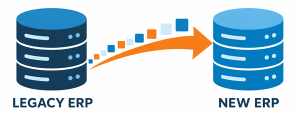 Replacing an ERP system changes how a business operates. It also puts years of business information and the reporting that depends on it under scrutiny. Customer and product codes may change. Account structures may be redesigned. Different locations may move on different schedules. Meanwhile, the business still needs to understand sales, inventory, purchasing, profitability, and cash flow.
At Silvon, ERP migration has been a key driver for many companies that have recently engaged with us. These businesses were looking beyond the mechanics of transferring records. They needed a way to preserve historical visibility, manage differences between systems, and give users reliable information throughout the transition.
We’ve found that the most effective approach is to plan the new ERP and long-term reporting environment together. This guide explains how to decide what to migrate, prepare and validate the data, convert essential reports, and establish a reporting foundation that continues to deliver value after go-live. It addresses both cloud and on-premises ERP replacements, including projects that consolidate multiple systems.
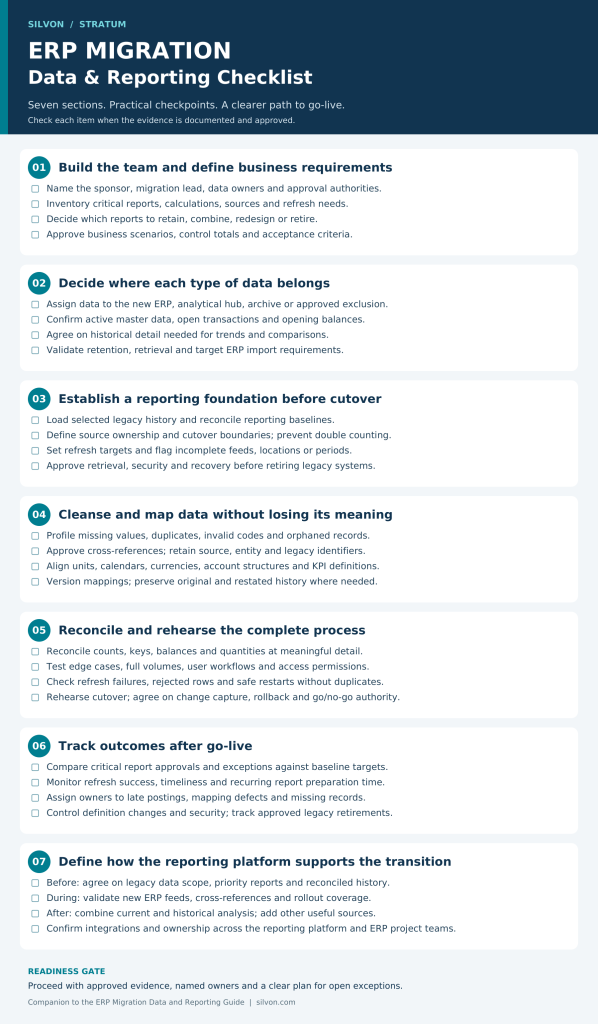
1. Build the team and define the business requirements
Data migration needs business ownership from the beginning. Your IT team and implementation partner can build extracts and conversion routines, but finance, sales, operations, and purchasing must determine what the information means and whether the results are usable.
Assign owners who can make and approve decisions
Name an executive sponsor to resolve cross-functional conflicts and protect resources. Give the migration lead responsibility for scope, dependencies, rehearsals, and issue tracking. Assign business data owners to customers, products, suppliers, accounts, and other critical domains. Include reporting analysts and people who understand legacy customizations and spreadsheet-based workarounds.
Security and records stakeholders should define access and retention requirements. The implementation partner should confirm target ERP import requirements and sequencing. Set recurring executive reviews for unresolved issues, budget implications, and readiness decisions, with named owners and due dates for every material exception.
Inventory your reports before converting them
List the reports used daily, weekly, monthly, and at year-end. For each report, record its owner, audience, decision supported, source data, calculations, filters, detail, distribution method, and required refresh frequency. Include operational documents that users may call reports, such as picking lists or invoice outputs; these may need to remain inside the ERP workflow.
Decide which reports to retain, combine, redesign, or retire. Repeated spreadsheet manipulation can signal a missing business definition or an integration requirement. A monthly margin report, for example, may depend on freight allocations, rebates, or customer groupings maintained outside the ERP. Capture those dependencies before the people or systems change.
Define success in business terms
Specify the questions users must still be able to answer after go-live. Can finance explain receivables by customer and aging bucket? Can sales compare year-to-date revenue with the prior year across changed product codes? Can operations compare inventory across plants during a phased rollout?
Turn those questions into acceptance criteria with approved control totals and representative user scenarios. Stewardship, consistent definitions, and business users’ responsibility for data fitness is crucial. Software can enforce rules, but it cannot decide which disputed customer relationship or accounting interpretation is correct.
2. Decide where each type of data belongs
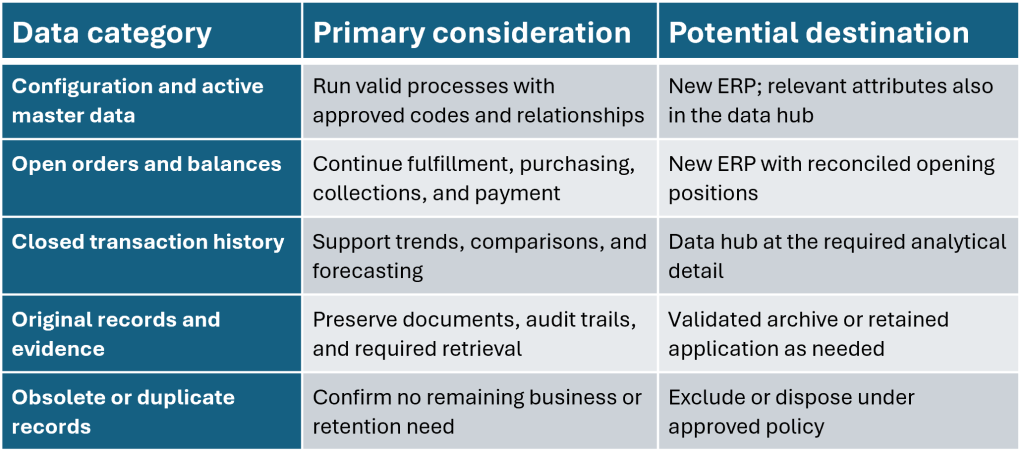
The first decision is not how much data can be moved. It is which information the business needs to operate in the new ERP, which information it requires for analysis, and which records it must retain for other purposes. Those requirements overlap, but they are not identical.
A new ERP usually needs configuration, approved master data, open transactions, inventory positions, and opening financial balances. Older, closed transactions may be more useful in an analytical hub. Original invoices, attachments, and audit records may require a separate retention solution. The precise allocation depends on business processes and the destination ERP’s supported conversion methods.
For example, Microsoft’s Dynamics 365 guidance distinguishes configuration data from migration data and identifies customers, products, and open transactions as migration examples. Its guidance also calls for explicit planning of scope, transformations, dependencies, and validation. The same planning discipline is useful across ERP platforms.
Preserve the detail actually used by the business
If you’re a distributor, you may need five years of invoice-line history to analyze customer buying patterns but only open receivables in the new ERP. But if you’re a manufacturer, you may need historical sales by product, location, and customer while transferring only current inventory positions and active production requirements. Agree on the reporting detail before summarizing or excluding data.
3. Establish a reporting foundation before cutover
A data hub like Silvon’s Stratum™ solution is a managed environment that integrates data from business systems, organizes it around common definitions, and makes it available for analysis using integrated analytics. In an ERP migration, the hub can separate the business’s reporting history from the life cycle of any one transactional application.
Before migration, the data hub can receive legacy ERP data and establish reconciled reporting baselines. During migration, it can bring together history and approved feeds from locations or functions already operating in the new ERP. After migration, it can continue supporting comparisons across the transition and incorporate CRM, MES, POS, planning spreadsheets, and other useful sources for reporting and analysis.
Support phased deployments with explicit ownership rules
If you’re moving one plant at a time to the new ERP, explicit ownership rules will be critical since one plant will be live in the new ERP while the other remains on the old platform. A shared data hub can report across both, provided each feed identifies the source system, entity, transaction, and cutover boundary. The design must specify which system owns each transaction during the overlap.
Without those controls, the same order or invoice could appear twice—once in the legacy extract and again in the new ERP feed. Imported opening balances can also be mistaken for new business activity. Establish rules for exclusions, reversals, corrections, and late postings before combining the data.
Make continuity measurable
Reporting continuity means users can access agreed reports at an agreed level of freshness, accuracy, and detail. It does not mean the data hub keeps order entry running during an ERP outage or can show new transactions when source feeds are unavailable. Show the latest successful refresh and identify incomplete locations or periods so users understand what they are seeing.
Loading and reconciling a focused set of high-value data before the ERP implementation can expose quality problems early. Start with the business’s most pressing questions—such as margin trends, inventory exposure, or overdue receivables—rather than attempting to rebuild every report at once. Keep the hub work aligned with the overall project’s staffing and critical path.
Reduce dependence on the legacy application (carefully!)
Retaining history in a data hub can support eventual legacy retirement and reduce the need to keep an old ERP available solely for analysis. Retirement should follow documented checks for historical detail, original records, audit evidence, retrieval, security, and recovery. An analytical dataset alone may not replace every function of the old application.
4. Cleanse and map data without losing its meaning
Start by profiling the actual data. Identify missing values, duplicates, invalid codes, orphaned records, inconsistent units, and unexpected date or currency formats. Assess custom tables and spreadsheets alongside standard ERP tables. A customer hierarchy that exists only in a sales workbook may be essential to enterprise reporting.
Resolve duplicates and conflicting identities
The same customer may have different identifiers in two ERP instances. Conversely, two different products may share the same item number in separate divisions. Retain source system and legal entity identifiers so records remain distinguishable. Apply approved cross-references to connect those local identities to enterprise customers, products, and suppliers.
Do not merge records on name similarity alone. A parent company, billing account, ship-to location, and buying group may represent different business relationships. Preserve the relationships users need to analyze rather than flattening them into one record.
Document transformations and cross references
Maintain a controlled mapping specification covering source and destination fields, data types, code conversions, defaults, validation rules, owners, and exception handling. Keep both legacy and new identifiers where needed for traceability. Record the effective dates of changes in customer ownership, product families, and reporting structures.
As an example for a tools manufacturer, two legacy item codes might become one new product family. Analysts may want history restated under the new family for comparison while finance needs the original classifications used at the time. Retaining both views avoids silently rewriting history.
Other differences require equal care: cases versus individual units, pounds versus kilograms, fiscal calendars, exchange rates, account structures, signs on credits, and definitions of gross and net sales. Align the business meaning of the data before comparing totals across systems.
Keep the data hub and ERP conversion responsibilities clear
A data hub can hold governed reference data and support mapping, comparison, and preparation of conversion datasets. Approved data may help seed master records, but the target ERP still needs its required import formats, dependencies, validation, and business rules. Confirm the specific tools and services required with both implementation teams.
If consolidation through opening journals or summarized balances is appropriate, retain sufficient supporting detail elsewhere and obtain finance approval. Summaries may simplify loading, but they should not eliminate the ability to explain balances or analyze meaningful trends. Version mapping rules so a later correction can be traced and reproduced.
5. Reconcile and rehearse the complete process
Successful imports are necessary, but they are not proof of successful conversion. Reconciliation must establish that the information is complete, accurate, and consistent with the approved business rules. Schedule it as a distinct workstream, with business sign-off for both the new ERP and the reporting hub.
Check totals and the records behind them
Compare record counts, distinct business keys, financial values, quantities, and exception counts between source extracts, transformed datasets, loaded ERP records, and hub outputs. Balance by entity, period, currency, and relevant operational dimensions. Grand totals can hide offsetting errors, so investigate meaningful differences at a more detailed level.
Examples include trial balance by account, open receivables and payables by document, inventory quantity and value by item and location, and open order quantities by line. Where the account structure changes, reconcile through an approved crosswalk. Document intended adjustments, rounding, or valuation differences instead of forcing unlike measures to match.
Expand from representative samples to realistic volumes
Begin with a small but varied dataset, including inactive customers, returns, credits, split shipments, partial receipts, unusual units, and intercompany transactions where relevant. Then expand to full volumes, dependencies, and realistic timing. Microsoft recommends verifying migration in both system integration testing and user acceptance testing environments.
Have users complete their daily processes with converted data. Test order fulfillment, purchasing, inventory movements, invoicing, collections, and month-end reporting as applicable. Verify permissions and drill-down access as well as totals. A report is not ready if its summary is correct but authorized users cannot retrieve the supporting detail.
Repeated data hub refreshes can reveal key mapping errors, late records, and failed loads before go-live. Monitor rejected rows and incomplete refreshes. Test restart behavior so a failed job can be rerun without duplicating data and confirm that extracts stay within agreed source-system capacity.
Rehearse the cutover and recovery decisions
Time the complete sequence: final extract, cleansing and transformation, loading, validation, reporting refresh, and user approval. Define how changes since the last rehearsal will be captured and how business activity is controlled during the final cutover window.
Agree on go or no-go authority, rollback triggers, backups, and handling of transactions entered after the switch. Publish who owns each system and dataset during the transition. A hub can support analytical access, but the ERP team must still manage the operational cutover and recovery plan.
6. Track outcomes after go live
Useful measures include the proportion of critical reports approved, unresolved reconciliation exceptions, refresh success and timeliness, time spent preparing recurring reports, and the number of legacy systems retired after approval. Establish baselines before implementation so improvement is measurable.
Give the post-go-live team time to investigate late postings, mapping defects, missing records, and changed report interpretations. Apply new security roles consistently and maintain a controlled process for revising definitions. Reporting continuity depends on those operating disciplines as much as on the initial design.
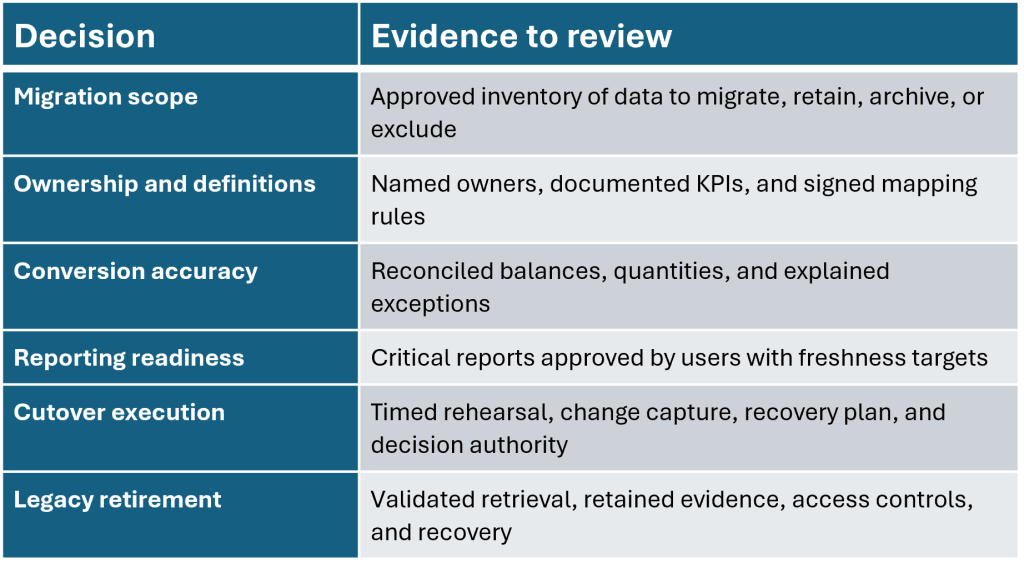
The goal is a manageable transition with explicit evidence at each decision point. Building reporting and history requirements into the plan early makes it easier to see what is ready, what remains unresolved, and which risks need executive attention.
A Practical Readiness Review
7. How Stratum™ supports the migration and what follows
Silvon’s Stratum platform combines a centralized data hub with business intelligence and reporting capabilities for manufacturers and distributors. It integrates ERP and other business data, aligns information for analysis, and makes it available through Stratum’s web interface and connections to Power BI and Excel.
For companies replacing an ERP, that creates a practical opportunity to establish a reporting foundation that spans the old and new environments. The scope should reflect the data available from each system, the required historical detail, and the reports users need at each stage.
Before the ERP transition
Use Stratum to bring selected legacy data into a shared analytical environment, identify inconsistent codes and definitions, and establish reconciled reporting. Address important sales, inventory, purchasing, or financial questions early so users can gain value while the ERP project proceeds.
During conversion and phased rollout
Retain agreed historical data and integrate validated information from the new ERP as locations or functions move. Govern cross-references and reporting rules so users can analyze performance across the transition. Reconcile each new feed and make its coverage and refresh status clear.
After the new ERP is live
Continue analyzing historical and current performance together, enrich the view with information from other sources, and expand reporting as business needs change. Stratum’s packaged metrics, dashboards, and reporting capabilities can provide a starting point, with Power BI and Excel integration extending how users work with the shared data.
Stratum supports the data management and analytical side of the migration. The target ERP implementation still requires its own approved conversion routines, operational validation, and cutover controls. Agree on responsibilities and confirm required integrations before committing to a project plan.
8. Plan your reporting future alongside your ERP future
An ERP replacement is an opportunity to improve the quality, consistency, and usefulness of the information that guides your business. Decide early which data belongs in the new ERP, how history will remain accessible, and how users will report across old and new systems. Those decisions can reduce unnecessary conversion work and preserve the context needed for better decisions long after go-live.
If an ERP migration is on your roadmap, talk with Silvon about your historical data, critical reports, and transition requirements. We can help evaluate how Stratum fits into a practical data and reporting strategy before, during, and after your move. Learn more at silvon.com.